Premium subscription
Limited offer: $9.99 FREE
Subscription benefits:
As Amazon associates we earn from qualifying purchases.
| General Info | ||
|---|---|---|
| Model Number | Huawei MateView | Asus TUF Gaming VG279QL1A |
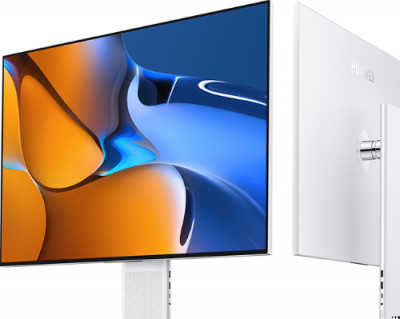
|
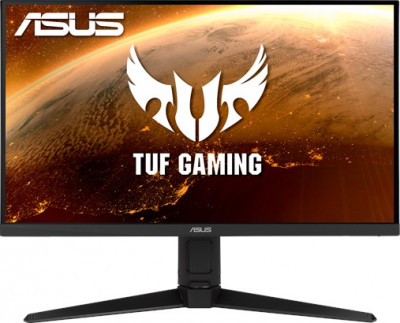
|
|
| Price | ||
| Type | Monitor | Monitor |
| Year | 2021 | 2020 |
| Brand | Huawei | Asus |
| Model Series | TUF Gaming | |
| Model Number | MateView | TUF Gaming VG279QL1A |
| Display | ||
| Screen Size Class | 28" (inches) | 27" (inches) |
| Diagonal Size | 26.96 in 68.5 cm 684.667 mm 2.25 ft |
|
| Screen Width | 23.95 in 60.8 cm 608.4 mm 2 ft |
23.54 in 59.8 cm 597.888 mm 1.96 ft |
| Screen Height | 13.24 in 33.6 cm 336.312 mm 1.1 ft |
|
| Display Type | IPS | IPS |
| Display Bit Depth | 10 bits | 8 bits |
| Frame Rate Control | No | |
| Max Number of Colors | 1073741824 | 16777216 |
| Bits | 30 | 24 |
| Screen Aspect Ratio | 16:9 | |
| Screen Resolution | 3840 x 2560 | 1920 x 1080 |
| Screen Pixel Pitch | 0.311 mm | |
| Screen Pixel Density | 81 ppi | |
| Screen-to-Body Ratio | 89.96 % | |
| Backlight Source | W-LED | W-LED |
| DCI P3 | 98% | 95% |
| sRGB | 100 % | 125 % |
| Screen Brightness | 500 cd/m² | 400 cd/m² |
| Static Screen Contrast | 1200 : 1 | 1000 : 1 |
| Screen Horizontal Viewing Angle | 178 ° | 178 ° |
| Screen Vertical Viewing Angle | 178 ° | 178 ° |
| Display Minimum Response Time | 8 ms | |
| Display Coating | Anti-glare/Matte | Anti-glare/Matte (3H) |
| HDR | DisplayHDR 400 | DisplayHDR 400 |
| 3D | No | No |
| Size, weight, color | ||
| Case Depth | 2.24 in 5.7 cm 56.95 mm 0.19 ft |
|
| Case Weight | 3.9 kg 9 lbs |
|
| Case Width with Stand | 23.95 in 60.8 cm 608.4 mm 2 ft |
24.18 in 61.4 cm 614.09 mm 2.01 ft |
| Case Height with Stand | 18.94 in 48.1 cm 481.1 mm 1.58 ft |
16.29 in 41.4 cm 413.65 mm 1.36 ft |
| Case Depth with Stand | 7.17 in 18.2 cm 182 mm 0.6 ft |
8.42 in 21.4 cm 213.79 mm 0.7 ft |
| Case Weight with Stand | 6.2 kg 14 lbs |
6.2 kg 14 lbs |
| Case Color | Moon Silver | Black |
| Hardware | ||
| Built-in Camera | No | No |
| Network | Wi-Fi 802.11a (IEEE 802.11a-1999) 802.11b (IEEE 802.11b-1999) 802.11g (IEEE 802.11g-2003) 802.11n (IEEE 802.11n-2009) 802.11n 5GHz 802.11ac (IEEE 802.11ac) Wi-Fi Direct Bluetooth 5.1 NFC |
|
| Connectivity | 2 x USB 3.0 (Type-A; downstream) 1 x HDMI 2.0 1 x 3.5 mm Audio Out (headphones and microphone) 1 x DisplayPort 1.2 (mini) 1 x USB (Type-C; 135W; power supply only) 1 x USB (Type-C; upstream; 65W; DP Alt Mode) |
1 x DisplayPort 1.2 1 x 3.5 mm Audio Out 2 x USB 3.0 2 x HDMI 2.0 |
| Audio | ||
| Audio Speakers | 2 x 5W | 2 x 2W |
| Features | ||
| Cool Features | DC Dimming Mode Smart Bar |
Color Temperature Selection Ultra-Low Blue Light Extreme Low Motion Blur Shadow Boost GameFast Input technology GaneVisual (Scenery/Racing/Cinema/RTS/RPG/FPS/sRGB Modes/MOBA Mode) Trace Free Technology Skin-Tone Selection GamePlus (Crosshair/Timer/FPS Counter/Display Alignment) Flicker-free technology Adaptive-Sync technology SPLENDID Video Preset Modes NVIDIA G-Sync compatible AMD FreeSync Premium technology QuickFit (Alignment Grid/Paper/Photo Modes) |
| Extra Features | Wi-Fi and wireless projection available for wireless version models - HSN-CBA | Anti-theft stand lock slot - Kensington |
| Ergonomics | ||
| Case Width | 24.18 in 61.4 cm 614.09 mm 2.01 ft |
|
| Case Height | 14.33 in 36.4 cm 364 mm 1.19 ft |
|
| Vesa Mount Support | No | Yes |
| VESA Interface Standard Size | 100 x 100 | |
| Removable VESA Stand | No | Yes |
| Height Adjustment | Yes | Yes |
| Height Adjustment Range | 110 mm 11 cm 4.3307 in 0.3609 ft |
120 mm 12 cm 4.7244 in 0.3937 ft |
| Landscape or Portrait Pivot Support | No | Yes |
| Left Pivot | 90 ° | |
| Right Pivot | 90 ° | |
| Left or Right Swivel Support | No | Yes |
| Left Swivel | 15 ° | |
| Right Swivel | 15 ° | |
| Forward and Backward Tilt Support | Yes | Yes |
| Forward Tilt | 5 ° | 5 ° |
| Backward Tilt | 18 ° | 23 ° |
| Frequency and Interpolation | ||
| Vertical Digital Frequency | 60 Hz | 48 Hz - 165 Hz |
| Horizontal Digital Frequency | 30 kHz - 200 kHz | |
| Screen Interpolation Measurement Unit | NULL | NULL |
| Accessories | ||
| Extras | MiniDP to DP cable 135W USB-C power adapter USB Type-C to Type-C cable |
DisplayPort cable (optional) HDMI cable (optional) |
| Certificates and Standards | ||
| Licenses | TUV Rheinland Low Blue Light Certified TUV Rheinland Flicker Free Certified |
BSMI CB CCC CE CEL level 1 CU ErP FCC J-MOSS RoHS UL/cUL VCCI WEEE WHQL (Windows 10 Windows 8.1 Windows 7) MEPS TUV Flicker-free eStandby TUV Low Blue Light RCM |
| Usage and Storage Requirements | ||
| Safe Operating Temperature Level | 0 °C - 40 °C 32 °F - 104 °F |
0 °C - 50 °C 32 °F - 122 °F |
| Safe Operating Humidity Level | 10 % - 85 % | |
| Internal Storage Temperature | -20 °C - 600 °C -4 °F - 1112 °F |
20 °C - 60 °C 68 °F - 140 °F |
| Internal Storage Humidity | 10 % - 90 % | |
| Max Operating Altitude | 5000 | |
| Max Storage Altitude | 12192 |
| Huawei MateView | Asus TUF Gaming VG279QL1A |