Premium subscription
Limited offer: $9.99 FREE
Subscription benefits:
As Amazon associates we earn from qualifying purchases.
| General Info | ||
|---|---|---|
| Model Number | Dell G3223D | BenQ PD2705Q |
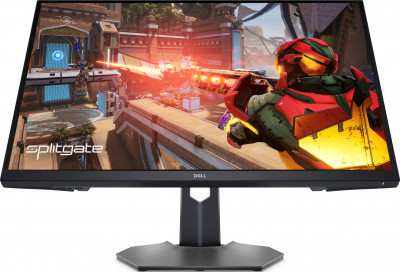
|
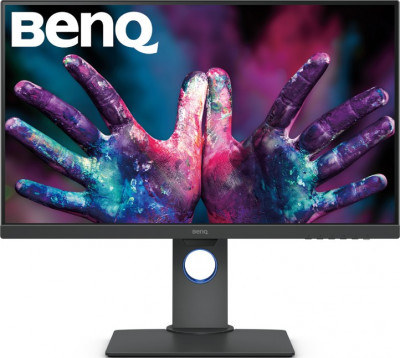
|
|
| Price | ||
| Type | Monitor | Monitor |
| Year | 2022 | 2020 |
| Brand | Dell | BenQ |
| Model Number | G3223D | PD2705Q |
| Display | ||
| Screen Size Class | 32" (inches) | 27" (inches) |
| Diagonal Size | 31.5 in 80 cm 800.01 mm 2.62 ft |
27 in 68.6 cm 685.8 mm 2.25 ft |
| Screen Width | 27.48 in 69.8 cm 698.112 mm 2.29 ft |
23.49 in 59.7 cm 596.736 mm 1.96 ft |
| Screen Height | 15.46 in 39.3 cm 392.69 mm 1.29 ft |
13.22 in 33.6 cm 335.664 mm 1.1 ft |
| Display Type | IPS | IPS |
| Display Bit Depth | 10 bits (8 bits + FRC) | 8 bits |
| Frame Rate Control | Yes | No |
| Max Number of Colors | 1073741824 | 16777216 |
| Bits | 30 | 24 |
| Screen Aspect Ratio | 16:9 | 16:9 |
| Screen Resolution | 2560 x 1440 | 2560 x 1440 |
| Screen Pixel Pitch | 0.272 mm | 0.233 mm |
| Screen Pixel Density | 93 ppi | 109 ppi |
| Screen-to-Body Ratio | 89.98 % | 88.67 % |
| Backlight Source | W-LED | W-LED |
| DCI P3 | 95% | |
| sRGB | 100 % | |
| Screen Brightness | 400 cd/m² | 300 cd/m² |
| Static Screen Contrast | 1000 : 1 | 1000 : 1 |
| Screen Horizontal Viewing Angle | 178 ° | 178 ° |
| Screen Vertical Viewing Angle | 178 ° | 178 ° |
| Display Minimum Response Time | 1 ms | 5 ms |
| Display Coating | Anti-glare/Matte (3H) | Anti-glare/Matte |
| HDR | DisplayHDR 400 | |
| 3D | No | No |
| Size, weight, color | ||
| Case Depth | 2.7 in 6.9 cm 68.61 mm 0.23 ft |
2.25 in 5.7 cm 57.2 mm 0.19 ft |
| Case Weight | 5.72 kg 13 lbs |
|
| Case Width with Stand | 28.08 in 71.3 cm 713.15 mm 2.34 ft |
24.17 in 61.4 cm 614 mm 2.01 ft |
| Case Height with Stand | 17.95 in 45.6 cm 456 mm 1.5 ft |
16.87 in 42.9 cm 428.5 mm 1.41 ft |
| Case Depth with Stand | 9.72 in 24.7 cm 246.94 mm 0.81 ft |
9.08 in 23.1 cm 230.7 mm 0.76 ft |
| Case Weight with Stand | 5.7 kg 13 lbs |
|
| Case Color | Black | Dark Gray |
| Hardware | ||
| Built-in Camera | No | No |
| Network | LAN | |
| Connectivity | 1 x USB 3.2 (Type-C; upstream; 90W; DP Alt Mode) 2 x HDMI 2.0 1 x 3.5 mm Audio Out 1 x DisplayPort 1.4 1 x USB 3.0 (charging) 1 x USB 3.2 (Type-A; Gen1; 5 Gbps downstream) |
1 x USB 3.1 (Type-B; upstream) 1 x HDMI 2.0 1 x DisplayPort 1.4 1 x 3.5 mm Audio Out 1 x DisplayPort (Out with MST) 1 x USB (Type-C; 65W; DP Alt Mode) 4 x USB 3.1 (Type-A; downstream) |
| Audio | ||
| Audio Speakers | 2 x 2W | |
| Features | ||
| Cool Features | Bino Vision Chroma Vision Low Blue Light ComfortView Plus Dell Display Manager On-Screen Display (OSD) menu Night Vision Crosshair Clear Vision 3-side bezelless design NVIDIA G-Sync Compatible Fast IPS AMD FreeSync Premium Pro Flicker-free technology |
Flicker-free technology HDR10 compatible CAD/CAM) KVM Switch Professional Modes (Darkroom Low Blue Light ICCsync AQCOLOR technology M-book DualView (Picture-by-Picture) Animation |
| Extra Features | Security lock slot | DesignVue Designer Monitor Anti-theft stand lock slot - Kensington |
| Ergonomics | ||
| Case Width | 28.08 in 71.3 cm 713.15 mm 2.34 ft |
24.17 in 61.4 cm 614 mm 2.01 ft |
| Case Height | 16.82 in 42.7 cm 427.21 mm 1.4 ft |
14.48 in 36.8 cm 367.9 mm 1.21 ft |
| Vesa Mount Support | Yes | Yes |
| VESA Interface Standard Size | 100 x 100 | 100 x 100 |
| Removable VESA Stand | Yes | Yes |
| Height Adjustment | Yes | Yes |
| Height Adjustment Range | 100 mm 10 cm 3.937 in 0.3281 ft |
120 mm 12 cm 4.7244 in 0.3937 ft |
| Landscape or Portrait Pivot Support | No | Yes |
| Left Pivot | 90 ° | |
| Right Pivot | 90 ° | |
| Left or Right Swivel Support | Yes | Yes |
| Left Swivel | 30 ° | 45 ° |
| Right Swivel | 30 ° | 45 ° |
| Forward and Backward Tilt Support | Yes | Yes |
| Forward Tilt | 5 ° | 5 ° |
| Backward Tilt | 21 ° | 20 ° |
| Frequency and Interpolation | ||
| Vertical Digital Frequency | 48 Hz - 165 Hz | 60 Hz |
| Horizontal Digital Frequency | 30 kHz - 250 kHz | |
| Screen Interpolation Measurement Unit | NULL | NULL |
| Accessories | ||
| Extras | DisplayPort cable USB Type-C cable |
DisplayPort cable HDMI cable (optional) USB Type-A cable USB Type-C cable |
| Certificates and Standards | ||
| Licenses | EPEAT Gold Energy Star RoHS TCO Certified Edge TUV Rheinland Flicker-free Certified TUV Rheinland Low Blue Light Certified (Hardware Solution) |
ENERGY STAR Mac Compatible Pantone Validated UL/cUL Verified by CalMAN Windows 10 Windows 8.1 Windows 8 Windows 7 |
| Usage and Storage Requirements | ||
| Safe Operating Temperature Level | 0 °C - 40 °C 32 °F - 104 °F |
0 °C - 40 °C 32 °F - 104 °F |
| Safe Operating Humidity Level | 10 % - 80 % | 10 % - 80 % |
| Internal Storage Temperature | -20 °C - 60 °C -4 °F - 140 °F |
|
| Internal Storage Humidity | 5 % - 90 % | |
| Max Operating Altitude | 5000 | |
| Max Storage Altitude | 12192 |
| Dell G3223D | BenQ PD2705Q |